How To Use Brick For Screen Time Without Feeling Restricted

Cutting screen time should not leave you disconnected from everyday life. Brick can work better when blocking routines fit the way you actually use your phone.
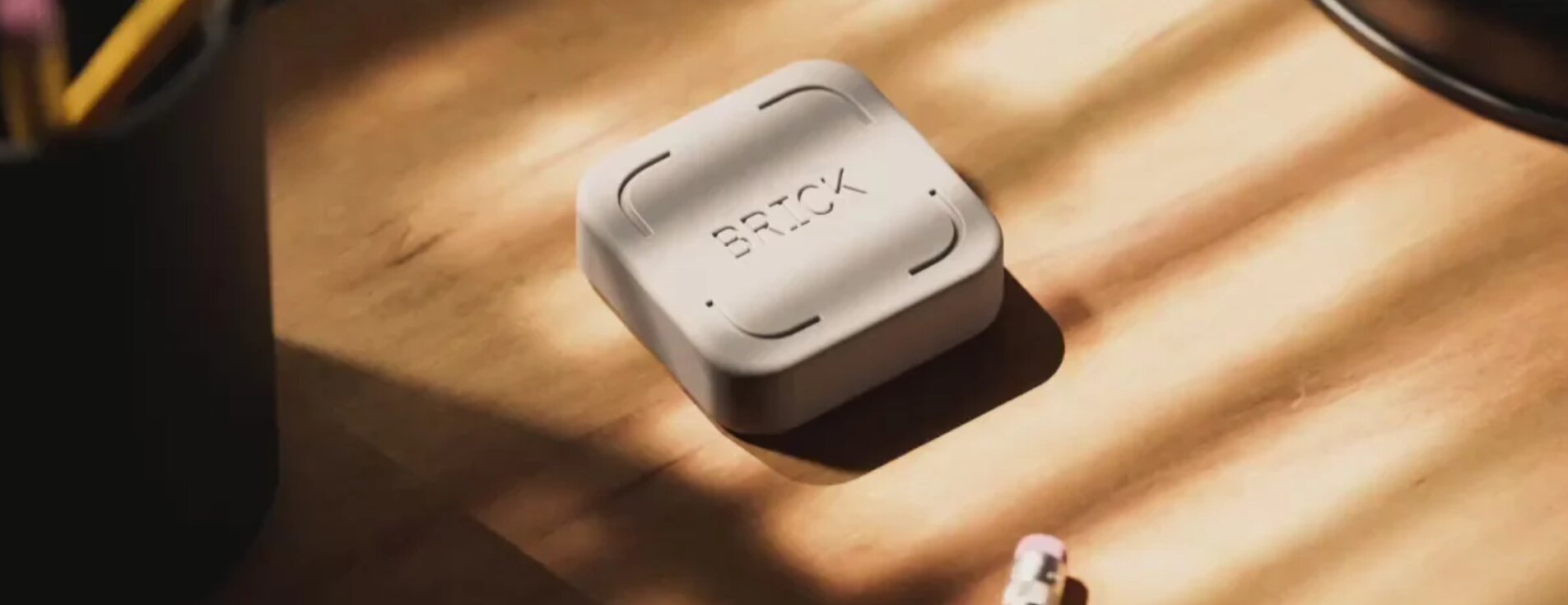
Cutting down on screen time seems easy until vital apps get caught in the process. It’s hard to quit smartphones entirely because they do so much: maps, texts, banking, music, calendars. Getbrick is more flexible, it allows users to choose what distractions to block, yet gives useful tools.
This approach is about shaping Brick to fit into your everyday routines, not creating overly rigorous setups, and creating habits that still feel realistic months later.
Why Finding Balance Matters More Than Eliminating Screen Time
A phone can squander an hour and save an hour in the same day. This contradiction is what makes extreme digital detox measures so hard to maintain. You might escape from deleting all the apps temporarily, but your phone is rapidly pulled back into its routine by day-to-day tasks.
A better place to begin is to assess which moments genuinely need to be protected. Work, supper, study, and bedtime need to be more bounded, travel or social plans need to be more open. Brick works best when each routine is a reflection of a real circumstance, not one blanket constraint.
The question is not how little you can use your phone. Think about the apps that keep breaking what you’re trying to do. The distinction maintains important functionality and makes it easier to repeat a blocking process.
Setting Up Brick Around Your Daily Routine
Screen limitations tend to be set excessively broad initially. Another practical way is to have distinct modes for different times of the day. Brick allows unique modes, so the same device can be used for several purposes without treating each hour the same.
Creating A Work Mode
Begin with apps that break concentration, instead than eliminating all entertainment. One work mode may feature social feeds, short movies, games and shopping apps, while email, calendars, authentication tools and messaging can stay at hand if your profession requires them.
The missed-task test is one useful way. Before you add an app to the blocked list, ask yourself what realistically would go wrong if you couldn’t open it for two hours. If the answer concerns work, transport, money or urgent communication, Access can minimise unnecessary frustration.
Creating A Personal Time Mode
Personal time needs a different boundary. Work email and team messaging may become distractions, while music, camera, maps, and communication with friends remain useful.
This approach can help during meals, walks, hobbies, and time with family. Instead of making the phone unusable, the mode removes apps most likely to pull attention away from the activity you chose.
Creating An Evening Mode
Usually evening routines require fewer choices. A simple scan of social feeds, news, video sites, shopping applications can result in surprisingly late nights.
Create an evening mode around the hours when scrolling becomes automatic. Keep anything genuinely useful for bedtime, such as alarms, podcasts, reading tools, or communication you may need. A routine that feels comfortable is more likely to survive beyond the first week.
Choosing Which Apps To Block
When people ask What Is Brick, the physical device often gets most of the attention. The more important decision happens inside the app because the quality of each block list determines how restrictive the experience feels.
Avoid choosing apps based only on total usage time. Some high use apps serve a clear purpose. Instead, notice which apps you open without deciding to open them. Those automatic taps are often better candidates for blocking than tools used intentionally for longer periods.
This configuration can be made more precise with a simple three day audit. Notice the apps opened because of boredom, difficult work, awkward pauses and bedtime. These experiences make personal distraction tendencies clearer than a generic list of supposedly dangerous apps.
Ways To Make Brick More Effective
A proper setup reduces the number of decisions that need to be repeated. If every session is negotiating, shifting the setting, or checking for exceptions, the system is just one more thing to manage.
Keeping The Device In A Separate Location
Physical distance is one of Brick’s most useful features. After activating a session, placing the device somewhere inconvenient can make impulsive unblocking less appealing.
When the unlimited use began to feel automatic again, people on Reddit have said they put Brick in another room or put their phone back into a prohibited status. A distance creates a moment of choosing before access is restored, and that may be enough to break an old habit.
The best location depends on your goal. A desk may function for work sessions, a hallway may help with evenings, and a permanent area at home may enable extended durations outside. Don`t hide the gadget so well that you can`t even access it.
Building Consistent Routines
Phone Blocks become easier to maintain when attached to events already happening every day. Activate a work mode after opening your laptop, a personal mode before dinner, or an evening mode while preparing for bed.
Consistency matters more than creating the longest possible session. A reliable ninety minute focus block can be more useful than an ambitious all day restriction that gets abandoned after several attempts.
Also, there is a good long term concern in Reddit conversations. Some individuals wonder if they will keep using the device if the novelty wears off. The best answer is routine design. A device employed at a predicted point requires less motivation than one recalled only after scrolling has already commenced.
Using Emergency Access Thoughtfully
Brick includes limited emergency access for situations where the physical device is unavailable. That safeguard matters because unexpected needs can happen.
Emergency access should still be a rare backup, not part of the daily grind. If you find yourself constantly creating a need to terminate a session for the same app, then you are probably in need of a mode change. It’s better to fix the problem at the source by editing the configuration, rather than using repeated exceptions.
Common Questions
Can Brick Still Leave Important Apps Available?
Yes. People can choose what apps to restrict so they can continue to use the important tools. Setting up is vital, since everybody has their own needs while working, travelling, nighttime and personal time.
Can One Brick Support Different Routines?
Yes. Custom modes can be created for activities such as work, study, family time, exercise, and sleep. Separate modes usually feel less restrictive than one large block list.
What Happens If Brick Is Lost?
The app includes limited emergency unblocks. These provide access when the physical device is unavailable, though they are best treated as a safeguard.
Getbrick works best when it fits naturally into real life instead of trying to control every minute of the day. Thoughtful modes, selective blocking, and consistent routines can protect attention while keeping useful phone functions available.
Follow Codeswodes for more practical lifestyle guides and everyday inspiration.
Recent Blogs
-

Belo Prebiotic Fibre Powder Benefits for Better Daily Gut Health
Adding enough fibre to your meals every day can be harder than it sounds, especially when busy routines get in the way. Prebiotic fibre can be a simple addition for those looking to support their daily gut health.
2026-02-02 17:40:00 -

Eternity Medicine Rx: 8 Top Wellness Picks
Discover the top Eternity Medicine Rx picks for longevity, energy, metabolic health, cellular support, and skincare, with practical tips for building a routine.
2026-08-20 11:28:00 -

WISKII Active Review: Top Picks for Women
Discover standout WISKII Active styles for workouts and everyday wear, including leggings, sports bras, and coordinated sets designed for comfort, stretch, support, and style.
2026-08-15 11:02:00 -

PLAUD NOTE Review 2024: The Ultimate AI Voice Recorder for Productivity
Explore our comprehensive PLAUD NOTE review. Find out how this ultra-thin AI voice recorder transforms meetings, phone calls, and lectures into structured text.
2026-08-16 03:49:00 -
Fresh Meal Plan Review: Is This Healthy Delivery Service Worth It?
Explore our comprehensive Fresh Meal Plan review. Learn about menu variety, nutritional quality, pricing, and if this prepared meal delivery service fits your busy lifestyle.
2026-08-12 05:20:00